What does “without a bank account” mean?
You might have a bank account but not want to connect it to an app through Open Banking or another bank-linking service. Or you might manage some or all of your money in cash. The method below works in either case. Headway does not require a linked bank account, but it cannot automatically know what you have spent. You need to enter and maintain your figures.
Make a plan for your next payday
- Choose a planning period. Start with the days until your next payday or paycheck. This is especially useful if income is irregular or bills arrive before the next payment.
- Write down money available. Use take-home income and any cash or balance you are willing to spend. Do not count a hoped-for payment until you know it is coming.
- Protect commitments first. List rent, utilities, debt payments, subscriptions and other bills due before your next income. Keep their dates visible.
- Plan essentials and goals. Allow realistic amounts for food and travel, then add a savings goal or buffer. A plan that omits everyday costs gives a misleading safe-to-spend figure.
- Update after spending. Record purchases, cash withdrawals and changed bills. Without bank sync, accuracy depends on this habit. A quick daily check is easier than reconstructing a week of receipts.
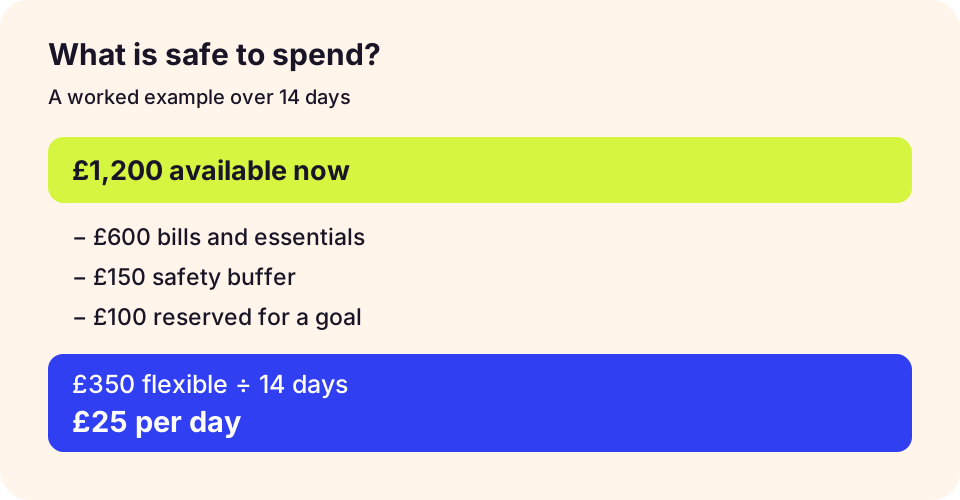
Worked example: what is safe to spend?
Suppose £1,800 is available until the next payday. You reserve £700 for rent, £230 for bills, £300 for groceries, £120 for travel, £100 for debt and £100 for savings. That leaves £250 for other spending over the period. This is an illustrative planning figure, not a promise that every expense has been captured. If another bill is due, subtract it first. The same method works with dollars for a US paycheck budget.
Try the free safe-to-spend calculator with your own income, bills and dates. For a fuller category plan, use the free budget planner. Both work on the website while the app is being prepared.
Manual entry versus bank sync
Manual entry lets you decide which details to record and avoids giving a budgeting app an ongoing bank feed. It can make you more deliberate, but it takes effort and becomes inaccurate if you fall behind. Bank sync can save time and reduce missed transactions, but it requires connecting an account through a provider and can bring in more transaction data than you want to share. Neither approach is automatically better for everyone.
Is Headway a fit?
Headway is designed as a private iPhone budget app for manually planning income, bills, spending and savings goals. It is designed for on-device financial records, with no required account or bank connection. It may suit you if control and privacy matter more than automatic imports. It is not a fit if you need live bank feeds, Android or a full web app. Read how Headway works and its privacy approach.
Headway 1.0 is free, with no active paywall or in-app purchase. Get Headway, or keep using the free web tools in the meantime.
What to do next
Start with one planning period and review the numbers on your next payday. If manual entry helps you make better decisions, keep it. If maintaining records becomes a burden, an app with bank sync may be a better fit. The point is a budget you can trust and actually use.
Check the workflow before choosing
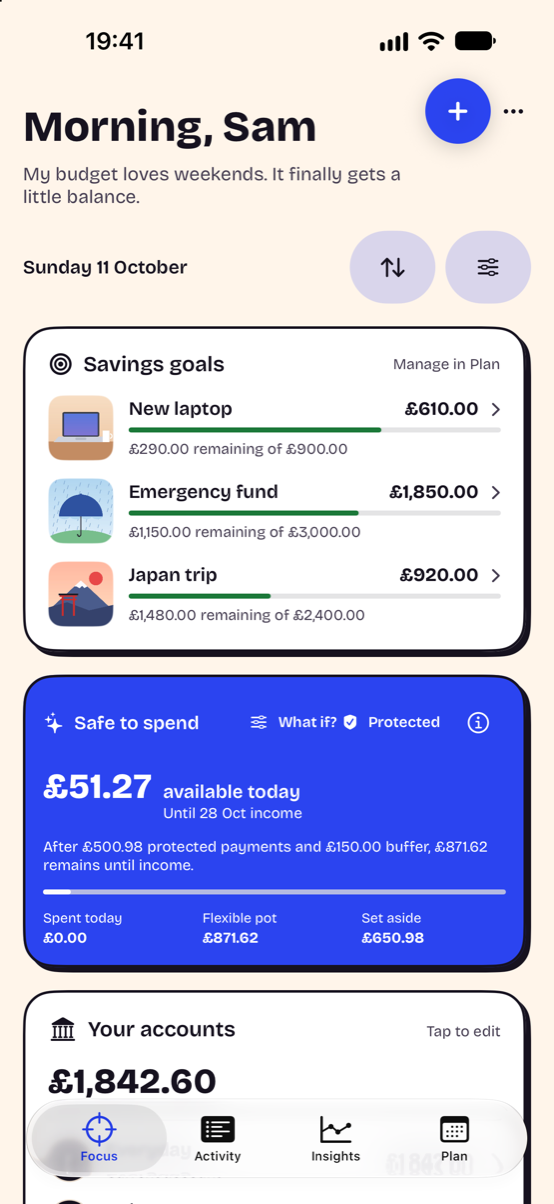
Try one full pay cycle with a starting balance, upcoming bills and a goal. Record a purchase, then check whether you understand the changed spending estimate. Headway’s screenshot uses demonstration data and does not show another app’s interface.
Read the safe-to-spend method, check the privacy checklist and explore Headway’s iPhone workflow.
Comparisons are written by Headway’s maker from current product information, not independent reviews. Read our editorial and corrections policy.